I was never so happy to boot someone to the curb as I was the day I booted Comcast, and switched to Mint Mobile Internet. Because I am deeply involved in Internet technology, and rely on robust and reliable Internet for all of my various professional endeavors, I had done a great deal of research and even, yes, soul searching before I switched to Mint who, not being one of the big 3 on which I’d and most of the techie geek population of a certain age had cut their Internet teeth, were slightly suspect. Could a service such as Mint, which provides their Internet service via 5G – and rebranded T-Mobile 5G at that – rather than DSL, fiber, or cable, really provide the solid and stable connectivity that I needed?
It turns out that’s a big “YES”!
Not only that, but it’s crazy-easy to set up once their router arrives at your door (which took about 48 hours from signup to delivery of the router).
That’s really all there is to it – open box, plug the router in, connect your devices, and you’re off to the races!
I’m *very* happy with my Mint Mobile Internet, so far great speeds (not like fiber of course, but as good as I was getting from Comcast), and no downtime! So that’s the review!
BUT IF YOU ARE GOING TO WANT TO RENAME YOUR ROUTER, KEEP READING BECAUSE YOU *HAVE TO DO THIS FIRST*!
I spent literally hours trying to figure out how to change the name of the router from the default “TMOBILE-XXY” to my actual preferred router name, and the router password from the default password to the password of my choice. In fact I spent over an hour just on the phone with Mint tech support who tried to be very helpful, but had no idea how to do it. I guess the average user who signs up with Mint doesn’t want to dig in under the hood, or change their router name – in fact I suspect that the average Mint user doesn’t even know that it’s called a router.
This wasn’t just vanity or some other whim, I have a *lot* of things connected to my router, and if I couldn’t rename the new router to have the same name as the router it was replacing, and ditto for the password, I was going to have a real hassle reconnecting every single device, from my printer to my Roku, and of course all of my computers and mobile devices. Sure it’s a first world problem, but it’s still a real hassle.
Finally the lightbulb came on: “This is router that is actually being provisioned by T-Mobile, it is just rebranded as Mint. Let me research how to rename a *T-Mobile* router.”
And sure enough T-Mobile has an app that you have to download, and you have to connect to the router *through the T-Mobile app*, and then you can rename your router, change the password, and do other adminny tasks.
The app is called T-Life and it’s available for both iPhone and Android.
When you first open the T-Life app it will prompt you to log in, and down at the bottom of that screen it will ask:
“Don’t have a T-Mobile ID?”
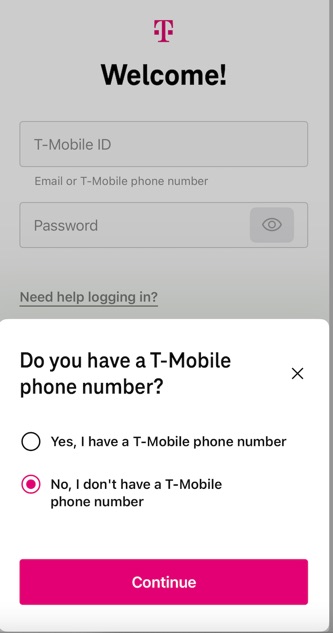
Click that (it’s a link) which will take you to a screen that says:
“Do you have a T-Mobile phone number?”
Check “No” and continue.
It then asks:
“Do you have a T-Mobile Internet gateway?”
Click “Yes” and you’re off to the races! The app will prompt you to connect to the router, and then you can admin it.
SO SET UP YOUR ROUTER WITH THE T-LIFE APP FIRST!
Then, and only then, *after* you set up your router with its new name and password, switch to using the Mint Mobile app that you are told to use with your spiffy new 5G router.